The workout log for the gym: Not too little. Not too much. Lagom.
Lagom (Swedish): just the right amount. Lagomove shows one exercise at a time, remembers your last weight and logs it in one tap. No heart-rate straps, no hype, no coach yelling. Just the right amount of app.
Full body · 2 of 5
Previous · Barbell back squat · 60 kg · Done
Bench press
3 sets × 10 reps
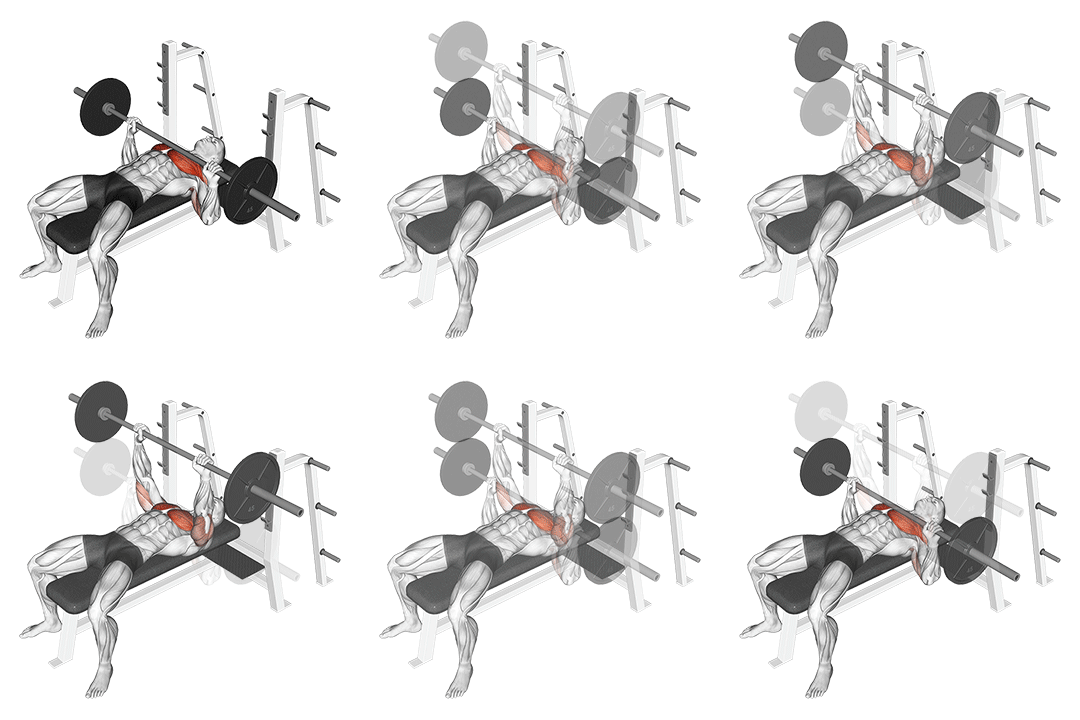
Lower to mid-chest, elbows tucked slightly.
Last time: 40 kg
Up next · Seated row · Not done
Just enough app for the hour you actually have
One exercise at a time
The current exercise, a short demo and your weight. Nothing else. Very lagom.
One-tap logging
Last time's weight is already filled in. Confirm with Done and move on.
Sessions that fit your time
Pick 20, 30, 45 or 60 minutes and get a ready-made session with the exercises that matter most.
A growing exercise library
Animated demonstrations and a technique cue for every exercise, from chest to core.
Progress that keeps you going
A weekly goal you pick yourself, ambitious but lagom. Weeks in a row, milestones and the weight you've added.
Private by default
Your history belongs to your account only. Delete it — and your account — at any time.
Three steps. A lagom amount.
- 1
Set your week
Choose how many sessions a week feels right. That is the whole setup.
- 2
Build a session
Pick a ready-made session for the time you have, or add exercises yourself.
- 3
Train and tap Done
Follow one exercise at a time. Your weights and progress are saved as you go.
What is Lagomove?
Lagomove is a free workout log for the gym that runs in your phone's web browser. It shows one exercise at a time with a short demo and a technique cue, remembers the weight you lifted last time and logs each set in one tap. Ready-made sessions fit 20, 30, 45 or 60 minutes.
Is Lagomove free?
Yes. Sign up with your email address and start training. There is nothing to pay.
What does "lagom" mean?
Swedish for not too little, not too much: just right. English has no word for it, so we borrowed it. It's also roughly how a gym session should feel.
Do I need to download an app?
No. Lagomove runs in the web browser on your phone, so there is nothing to install. Add it to your home screen if you want it one tap away.
Is it good for beginners?
Yes. Ready-made sessions choose the exercises for you, and every exercise has a short animated demo and a technique cue. If you already have a routine, build your own sessions instead.
How long is a session?
You decide: 20, 30, 45 or 60 minutes. Lagomove puts together a session that fits, and you can add, remove or reorder exercises in the session builder.
How does it track my progress?
Every set you finish is saved with its weight, and next time that weight is already filled in. Home shows your weekly goal, weeks in a row, milestones and how much weight you have added since your first session.
Who can see my training history?
Only you. Your history belongs to your account, and you can delete it, together with the account, at any time in Settings.
Which languages does it support?
English and Swedish. Lagomove follows your phone's language, and you can change it in Settings. Exercise names stay in English, as they are in most gyms.
Who makes Lagomove?
Vubit AB, a Swedish software studio that builds and runs its own products. Read more about the company at vubit.se.